


Booking Calendar can load plugin translations from two different sources:
1. WordPress.org Translations
Translations provided through the official WordPress.org translation system are available here:
Booking Calendar translations at WordPress.org.
On your website, these translation files are normally stored in: ../wp-content/languages/plugins/
WordPress can automatically download and update these translations when language packs are available.
2. Local Booking Calendar Translations
Booking Calendar also provides its own set of Local Translations.
These translations are maintained specifically for the Booking Calendar plugin and, for some languages, may contain more translated terms than the translations currently available from WordPress.org.
The Local Translation files are stored inside the Booking Calendar plugin folder: ../wp-content/plugins/booking/languages/
You can also download the original PO translation files manually from:
Booking Calendar translation files.
How Booking Calendar Selects the Translation Source
By default, Booking Calendar first tries to load translations from: ../wp-content/languages/plugins/
If the required translation is not available there, Booking Calendar can use the translation files located in: ../wp-content/plugins/booking/languages/
You can change which translation source should be loaded first in the Booking Calendar settings.
3. Available Local Translations
The following Local Translations are currently available for Booking Calendar:
- English
- Dutch                        100.00% [ 6319 / 6319 ], fuzzy 0, not translated 0
- French (France)              100.00% [ 6319 / 6319 ], fuzzy 0, not translated 0
- Spanish (Spain)              100.00% [ 6319 / 6319 ], fuzzy 0, not translated 0
- Ukrainian                    100.00% [ 6319 / 6319 ], fuzzy 0, not translated 0
- Danish                       36.78% [ 2324 / 6319 ], fuzzy 2212, not translated 1783
- German                       30.91% [ 1953 / 6319 ], fuzzy 2535, not translated 1831
- Norwegian (Bokmål)           30.67% [ 1938 / 6319 ], fuzzy 2173, not translated 2208
- Hungarian                    28.71% [ 1814 / 6319 ], fuzzy 2589, not translated 1916
- Korean                       28.68% [ 1812 / 6319 ], fuzzy 2579, not translated 1928
- Portuguese (Brazil)          24.88% [ 1572 / 6319 ], fuzzy 2674, not translated 2073
- Greek                        24.69% [ 1560 / 6319 ], fuzzy 2678, not translated 2081
- Turkish                      24.42% [ 1543 / 6319 ], fuzzy 2689, not translated 2087
- Italian                      23.90% [ 1510 / 6319 ], fuzzy 2573, not translated 2236
- Spanish (Mexico)             22.95% [ 1450 / 6319 ], fuzzy 2735, not translated 2134
- Polish                       22.77% [ 1439 / 6319 ], fuzzy 2721, not translated 2159
- Finnish                      22.74% [ 1437 / 6319 ], fuzzy 2748, not translated 2134
- Romanian                     22.58% [ 1427 / 6319 ], fuzzy 2741, not translated 2151
- Swedish                      22.47% [ 1420 / 6319 ], fuzzy 2748, not translated 2151
- Russian                      22.17% [ 1401 / 6319 ], fuzzy 3018, not translated 1900
- Arabic                       22.16% [ 1400 / 6319 ], fuzzy 2776, not translated 2143
- Slovenian                    21.59% [ 1364 / 6319 ], fuzzy 2768, not translated 2187
- Bulgarian                    21.47% [ 1357 / 6319 ], fuzzy 2778, not translated 2184
- Chinese (Taiwan)             20.95% [ 1324 / 6319 ], fuzzy 2809, not translated 2186
- Portuguese (Portugal)        20.78% [ 1313 / 6319 ], fuzzy 2793, not translated 2213
- Japanese                     20.62% [ 1303 / 6319 ], fuzzy 2260, not translated 2756
- Chinese (China)              20.21% [ 1277 / 6319 ], fuzzy 2794, not translated 2248
- Thai                         19.69% [ 1244 / 6319 ], fuzzy 2831, not translated 2244
- Catalan                      19.62% [ 1240 / 6319 ], fuzzy 2730, not translated 2349
- Hebrew                       19.61% [ 1239 / 6319 ], fuzzy 2817, not translated 2263
- Galician                     19.09% [ 1206 / 6319 ], fuzzy 2865, not translated 2248
- Slovak                       17.88% [ 1130 / 6319 ], fuzzy 2763, not translated 2426
- Croatian                     17.31% [ 1094 / 6319 ], fuzzy 2778, not translated 2447
- Czech                        17.04% [ 1077 / 6319 ], fuzzy 2730, not translated 2512
- Chinese (Hong Kong)          10.14% [ 641 / 6319 ], fuzzy 1872, not translated 3806
Note: Translation progress changes over time as new Booking Calendar features and new text strings are added.
4. How to Activate Local Translations
If the translation from WordPress.org is incomplete, or if the Local Translation contains more translated terms, you can configure Booking Calendar to load the Local Translation first.
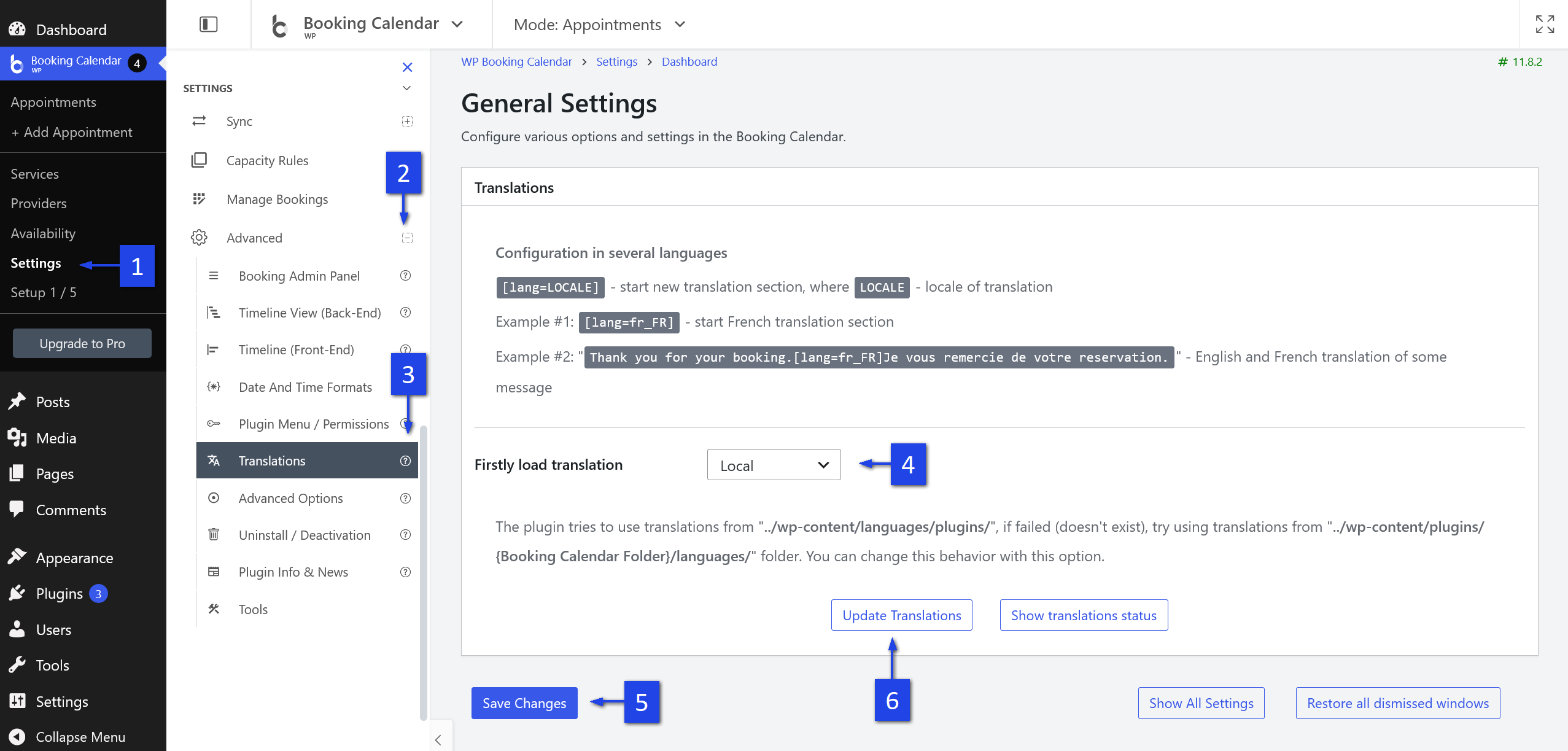
- Go to WP Booking Calendar > Settings General.
- Scroll to the Translation section.
- Find the Firstly load translation option.
- Select Local.
- Click Save Changes.
Booking Calendar will now give priority to the Local Translation files included with the plugin.
How to Download or Update Local Translations
After selecting Local as the preferred translation source, you can download the latest available Local Translation files directly from the Booking Calendar settings.
- Go to WP Booking Calendar > Settings General.
- Open the Translation section.
- Make sure that Firstly load translation is set to Local.
- Click Save Changes if you changed this option.
- Click the Update Translations button.
- Wait while Booking Calendar downloads and updates the Local Translation files.
After the update is completed, refresh the Booking Calendar pages and check the translation.
If you still see untranslated terms, make sure that the correct language is selected in:
WordPress > Settings > General > Site Language.
If you are using a multilingual plugin, the active language can also be determined by that plugin.
How to Create or Improve a Translation
If some terms are missing or translated incorrectly, you can create a new translation or improve an existing one.
Please follow our step-by-step guide:
How to Make a New Translation of the Booking Calendar Plugin.
We welcome contributions for new languages and corrections to existing translations.
After updating the PO translation file, you can send it to us so it can be included in future Local Translation updates.